## **PanoRulerPlugin**
:::info
全景标尺依赖如视 OpenAPI 获取标尺数据,您可以参考 [OpenAPI 文档](https://open.realsee.cn/docs/api-reference) 了解如何获取全景标尺数据。
全景标尺数据 open API 对应接口为:`/open/v1/entity/pano_ruler/plugin`
:::
## 功能说明
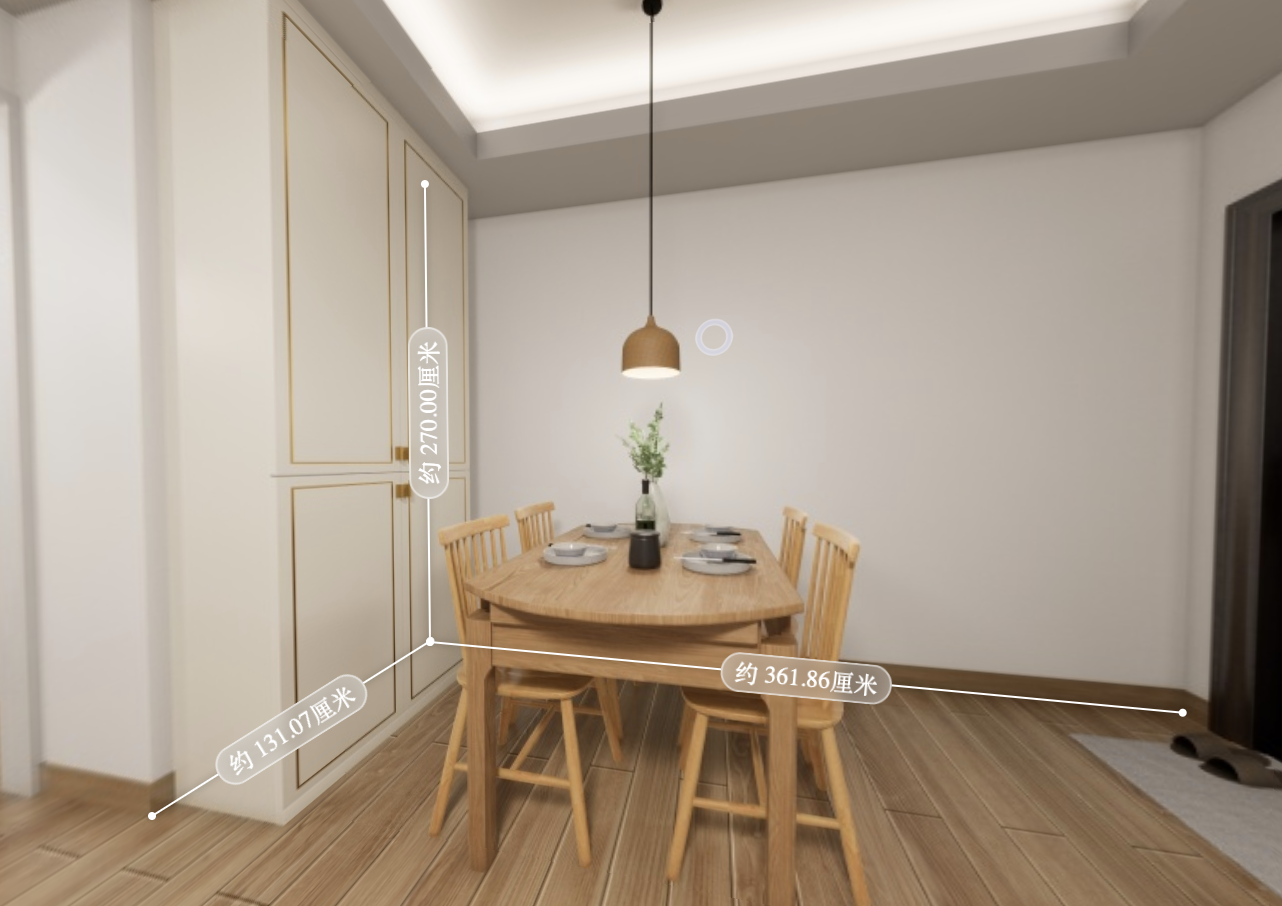
**全景标尺插件** 提供在全景模式下标注房源关键轮廓的尺寸。
详细功能点如下:
- 提供在全景模式下标注房源关键轮廓的尺寸,比如分间的层高、面宽和径深等信息;支持实景 VR 和虚景 VR 的场景。
- 只展示当前视角下靠近中心位置的标尺线。
- 移动走点及变换视角时,标尺线会跟随移动和变换。
- 数值气泡长度自适应:根据数值内容自适应气泡长度,同时支持数值内容根据特殊需求配置,比如数值有英寸单位的需求。
- 若标尺线长度低于该标尺的数值气泡长度,则不展示该标尺线。
## 安装引用
**请按需选择 `yarn` 或 `npm` 安装方式:**
```bash npm2yarn
npm install @realsee/dnalogel
```
**通过 es 引用:**
```tsx
import { PanoRulerPlugin } from "@realsee/dnalogel"
```
## 开发指南
### 初始化
在初始化 `Five` 实例时,将 `PanoRulerPlugin` 配置在初始化插件参数即可。
```ts
import { Five } from '@realsee/five'
import { PanoRulerPlugin } from "@realsee/dnalogel";
const five = new Five({
plugins: [
[
PanoRulerPlugin,
'panoRulerPlugin', // 自定义插件名称
{
// 参数配置
}
]
]
})
```
### React 初始化
在创建 `FiveProvider` 时,将 `PanoRulerPlugin` 配置在初始化插件参数即可。
```ts
import { PanoRulerPlugin } from "@realsee/dnalogel";
import { createFiveProvider, FiveCanvas } from "@realsee/five/react";
const FiveProvider = createFiveProvider({
plugins: [
[
PanoRulerPlugin,
'panoRulerPlugin', // 自定义插件名称
{
// 参数配置
}
]
]
});
```
### Vue 初始化
在使用 `FiveProvider` 时,将 `PanoRulerPlugin` 配置在初始化插件参数即可。
```vue
```
### 载入数据
```ts
// 获取插件实例,其中 `panoRulerPlugin` 是初始化时自定义的名称
const pluginInstance = five.plugins.panoRulerPlugin
// 调用 `load` 方法载入全景标尺数据
pluginInstance.load(roomInfo, roomRules, { distanceText: (distance) => `约 ${distance.toFixed(1)}米` })
```
:::tip
**distanceText 说明:**
如视标尺数据输出单位默认值为**m**,如有其他单位需求,可通过传入 `distanceText` 回调方法更改单位描述和增加统一描述信息。以**厘米**为例:
```ts
pluginInstance.load(roomInfo, roomRules, { distanceText: (distance) => `约 ${(distance * 100).toFixed(2)}厘米` })
```
需将回调参数 `distance` 做 **distance * 100** 处理,以达到将米换算为厘米的目的。`toFixed()` 用以设置小数点后保留位数。
效果展示:
:::
### 核心方法
- `load: (roomInfo?: RoomInfo, roomRules?: RoomRules, options?: PanoRulerPluginOptions) => Promise` 载入插件数据
> 您需要手动载入插件数据,数据来源请阅读[开发 API](https://open.realsee.cn/docs/api-reference)。
- `enable: () => void` 打开标尺
- `disable: () => void` 关闭标尺
## demo 源码参考
[示例源码](https://github.com/realsee-developer/dnalogel/tree/main/src/PanoRulerPlugin)
网页版本:https://open.realsee.cn/docs/dnalogel/PanoRulerPlugin
文档索引:https://open.realsee.cn/docs.md